
Back to school is a stressful time, as it often means adjusting to a new schedule. Even if your child can’t read yet, a visual schedule can help simplify life.
Focus on Back-to-School Success: Visual Schedules
Starting a new school year can bring a mix of excitement, nerves, and stress, especially for families with special needs children. For many families, the most challenging part of going back to school isn’t academics—it’s transitions: waking up earlier, adjusting to new routines, and figuring out what’s expected.
One tool that can help? A visual schedule.
Visual schedules help children see what’s coming next. Instead of relying on memory, written instructions, or verbal directions, your child gets a concrete, visual way to understand and follow their day, step by step.
Visual schedules use pictures instead of words, reducing misunderstandings and helping your child strengthen executive functioning skills such as planning, managing emotions, and organization.
Whether your child is non-verbal, just learning to read, or struggles with routine changes, a visual schedule can help create calm, confidence, and consistency.
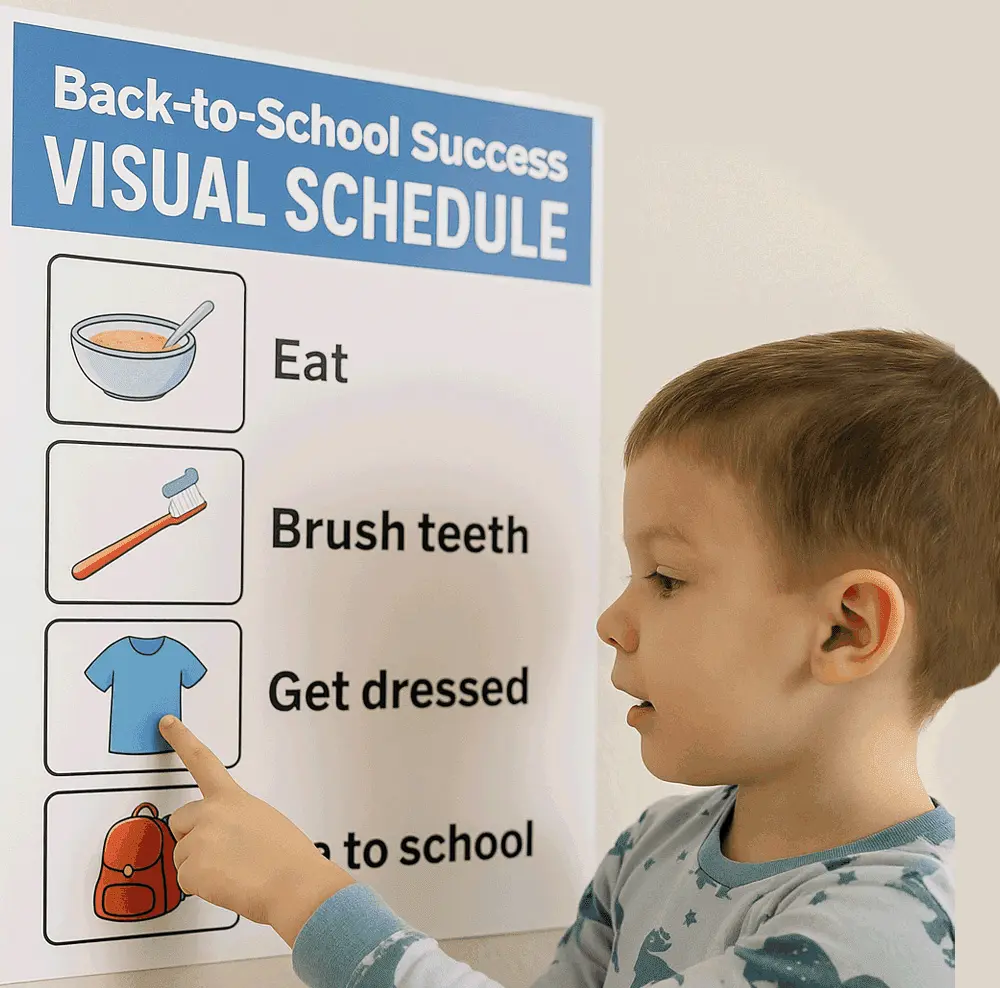
A child may know they have to eat breakfast, brush their teeth, and get dressed, but they may not remember the correct order. A visual schedule allows them to see the steps in order, smooth transitions, and helps them accomplish those tasks.
It can be:
- A row of real photos (e.g., “eat breakfast,” “brush teeth”)
- A strip of picture cards with drawings or symbols
- A simple “first/then” chart with two steps
- A laminated routine checklist that they mark off
For example:
🥣 Eat → 🦷 Brush teeth → 👕 Get dressed → 🎒 Go to school
Why Visuals Work for Kids with Intellectual and Developmental Disabilities
Sensory processing challenges, ADHD, and autism can cause some children to feel confused or overwhelmed when presented with a list of steps.
Children with intellectual and developmental disabilities (IDD) often need:
- Extra time to process instructions
- Help with understanding routines
- Predictability to feel safe
Visual schedules provide those benefits in the following ways:
- Break down tasks into small, manageable steps
- Reduce stress and meltdowns to support emotional regulation
- Help with time management and organization
- Support various learning styles
- Build independence and accountability as children learn to do things “on their own”
- Support memory and sequencing
- Allow your child to move at their own pace
“We started using a First/Then board just to get out the door. Now my daughter uses a full-day chart, and it’s part of her routine. She loves moving the cards when she’s done!”
— Parenting Special Needs Reader
How to Pick the Right Type of Visual Schedule
Every child is unique, and their visual schedule should cater to their individual needs. Here’s how to choose a schedule that matches your child’s needs:
If your child…
Try this…
Doesn’t read
Real photos or simple drawings
Gets overwhelmed easily
First/Then board (just 2 steps)
Likes to touch and move things
Laminated flip cards or a Velcro chart
Needs repetition every day
Daily chart with the same order & visuals
Is learning or likes to read
Simple word lists or text with images
 [1]
[1]
How to Create a Visual Schedule: Step-by-Step Instructions
When creating your visual schedule, consider whether your child requires transition time between tasks. Perhaps they need to engage in physical activity or deep breathing exercises between brushing their teeth and putting on pajamas. If so, incorporate a visual timer into the routine.
- Determine which type of visual schedule will work best for your child and gather the materials (photos, drawings, card stock, paper, etc.).
- Choose the part of the day or task chain to create. It’s best to start small with a particular time, such as a morning routine, sensory break, after-school actions, or bedtime rituals.
- Break the actions down into simple steps. For bedtime, this could look like
- Put away toys
- Brush teeth
- Wash face
- Put on pajamas
- Pick visuals that your child best understands, such as:
- Real photos (from magazines or ones that you take—some children like to see pictures of themselves doing the tasks)
- Picture symbols (PECS, Boardmaker, or clipart)
- Cartoon images
- Illustrations
- Put the steps in order using tape, rings, Velcro, or a dry-erase sheet. Keep the layout simple, clean, and uncluttered.
- Practice using it with your child, showing them how to point, move, flip, or check off each step.
Are Visual Schedules Only for Young Children?
No, visual schedules are for anyone who can benefit from following steps in picture formats. Many teens and young adults with intellectual and developmental disabilities can benefit from them.
However, when creating this for an older child, the images need to appear age-appropriate and feel relevant to their daily life or vocational activities.
For example, visual schedules for older children may take on varying themes, such as:
- Independent living tasks: cooking, cleaning, hygiene, laundry
- Job routines: dressing in appropriate attire (uniform), clocking in, job tasks, clocking out
- Community outings: bus routes, shopping list, appointments
Tips for Success
Start with only one routine at a time to avoid overwhelming your child. Trying to introduce multiple visual schedule boards at one time can increase anxiety.
Once your child feels comfortable with one, you can introduce a second board.
If possible, let your child help create the visual schedule board. They will be more likely to use it when they have helped to make it.
Be consistent with the schedule to help build familiarity.
Acknowledge when they complete tasks, as celebrating even small achievements can boost self-esteem and foster motivation.
Keep the schedule visible in a place with easy access. That way, it is not forgotten.
What If It’s Not Working?
Don’t fret that you’re doing something wrong. Everything new takes time, and adjusting to using a visual schedule may take some children longer than others. Here are some ways to tweak or help the process:
If…
Try…
Your child ignores it
Let them help build it—give them control
It’s too long or confusing
Use fewer steps (start with 2–3 max)
They resist change
Keep part of the schedule the same each day
They need more support
Add a reward or success token at the end
“When we added a picture of her favorite stuffed animal at the end of the chart, my daughter started using it more consistently. That’s her ‘reward’—getting to hold it when the schedule is finished.”
— PSN Parent Contributor
Final Thoughts
Visual schedules are more than just picture charts. They’re tools for empowerment that help your child understand, prepare, and succeed in ways that work for them. They also help reduce your stress and pressure.
Start simple, stay consistent, embrace versatility, and celebrate every small win.
Additional Sources:
https://www.parentingspecialneeds.org/article/useful-tools-life-skills-apps/ [2]
Additional Visual Support Options for Your Child
- Embracing Your Child’s Best Ways of Learning 12 Different Ways to Learn [4]
- School Schedule at Your Fingertips {Tip 15 of 31} [5]
- Apps for Task Management & Organization [6]
- Parenting Multiple Kids With Different Abilities Hourly Schedule [7]
- Draw Out Understanding: How to Sketch or “Doodle” to Help Your Child Understand [8]
- Starting Your Day off Right: Making the Most of Morning Routines [9]
- Help Motivate Your Kids With A Vision Board [10]
- Life Skills You Can Help Your Child Practice This Summer! [11]
- School Schedule at Your Fingertips {Tip 15 of 31} [5]
- Break It Down Tech Tools for Task Analysis [12]
- School Homework Hacks [13]
- The Benefits of Delegating Your to-do List to Your Kids [14]
- Parent Solution: Closet Mirror Door “Visual Schedule” [15]
This post originally appeared on our July/August 2025 Magazine [16]